
In today’s digital age, cybersecurity is of utmost importance. One crucial component in protecting your network from unauthorized access is an Intrusion Detection System (IDS). This article will explore an IDS, how it works, and why it is essential for enhancing cybersecurity defenses.
What is an Intrusion Detection System (IDS)?
An Intrusion Detection System (IDS) is a security tool that monitors network traffic and detects unauthorized or suspicious activity. It works by analyzing network packets and comparing them against a database of known attack signatures or behavioral patterns. When an IDS detects a potential intrusion, it can generate alerts or block the suspicious activity. IDSs can be either network-based, monitoring network traffic, or host-based, monitoring activity on individual devices. Overall, an IDS plays a crucial role in identifying and preventing cyber threats, helping to protect your network and sensitive data.
How does an IDS work?
An Intrusion Detection System (IDS) constantly monitors network traffic and analyzes it for signs of unauthorized or suspicious activity. It compares network packets against a database of known attack signatures or behavioral patterns. If the IDS detects activity matching these signatures or patterns, it can generate alerts to notify the network administrator. The warnings can include information about the attack type, the source IP address, and the target IP address. In some cases, the IDS can also block suspicious activity, such as blocking the IP address or terminating the connection. Overall, an IDS is an essential cybersecurity tool as it helps identify and prevent potential cyber threats, ensuring the security of your network and sensitive data.
Types of IDS: Network-based vs. Host-based.
There are two main types of Intrusion Detection Systems (IDS): network-based and host-based.
A network-based IDS monitors and analyzes network traffic for any signs of unauthorized or suspicious activity. It can detect attacks targeting the network as a whole, such as port scanning, denial-of-service attacks, or attempts to exploit vulnerabilities in network protocols. Network-based IDSs are typically deployed at strategic points in the network, such as the perimeter or critical segments, to monitor all incoming and outgoing traffic.
On the other hand, a host-based IDS focuses on the individual hosts or devices within the network. It monitors the activity on a specific host, such as a server or workstation, and looks for any signs of unauthorized access or malicious behavior. Host-based IDSs can detect attacks specific to a particular host, such as malware infections, unauthorized changes to system files, or suspicious user activity.
Network-based and host-based IDSs have advantages and can complement each other in a comprehensive cybersecurity strategy. Network-based IDSs provide a broader network view and can detect attacks targeting multiple hosts or devices. Host-based IDSs, on the other hand, provide more detailed information about the activity happening on individual hosts and can detect attacks that may go unnoticed at the network level.
By implementing both types of IDSs, organizations can enhance their cybersecurity defenses and better detect and prevent unauthorized access to their network.
Benefits of implementing an IDS.
Implementing an Intrusion Detection System (IDS) can offer several benefits to organizations seeking to enhance their cybersecurity defenses.
Firstly, an IDS can help detect and prevent unauthorized access to the network. By monitoring network traffic or individual hosts, an IDS can identify suspicious or malicious activity and alert the organization to threats. This early detection can help prevent data breaches, unauthorized access to sensitive information, or the spread of malware within the network.
Secondly, an IDS can provide valuable insights into the types of attacks and vulnerabilities targeting the organization’s network. By analyzing the patterns and signatures of detected attacks, organizations can better understand their network’s weaknesses and take proactive steps to strengthen security.
Additionally, an IDS can assist in incident response and forensic investigations. When a security incident occurs, an IDS can provide detailed logs and information about the attack, helping organizations identify the source, assess the impact, and take appropriate actions to mitigate the damage.
Furthermore, implementing an IDS can help organizations comply with regulatory requirements and industry standards. Many regulations and frameworks, such as the Payment Card Industry Data Security Standard (PCI DSS) or the Health Insurance Portability and Accountability Act (HIPAA), require organizations to have intrusion detection capabilities to protect sensitive data.
Overall, an IDS is a crucial component of a comprehensive cybersecurity strategy. An IDS can significantly enhance an organization’s cybersecurity defenses by detecting and preventing unauthorized network access, providing insights into vulnerabilities, assisting with incident response, and ensuring regulatory compliance.
Best practices for configuring and managing an IDS.
Configuring and managing an Intrusion Detection System (IDS) requires careful planning and implementation to ensure it effectively detects and prevents unauthorized access to your network. Here are some best practices to consider:
1. Define clear objectives: Before implementing an IDS, clearly define your organization’s objectives and what you want to achieve with the system. This will help guide your configuration and management decisions.
2. Regularly update signatures: IDS relies on signatures to detect known threats. It is crucial to regularly update these signatures to stay up to date with the latest threats and vulnerabilities. Consider automating the update process to ensure timely updates.
3. Customize rules and alerts: Tailor the IDS rules and alerts to match your organization’s specific needs and network environment. This will help reduce false positives and focus on the most relevant threats.
4. Monitor and analyze alerts: Actively monitor and analyze the alerts generated by the IDS. This will help identify patterns, trends, and potential security incidents. Implement a centralized logging and analysis system to streamline this process.
5. Conduct regular vulnerability assessments: Regularly assess your network for vulnerabilities and weaknesses. Use the insights gained from these assessments to fine-tune your IDS configuration and prioritize security measures.
6. Collaborate with other security tools: Integrate your IDS with other security tools, such as firewalls and antivirus software, to create a layered defense strategy. This collaboration can enhance the overall effectiveness of your cybersecurity defenses.
7. Train and educate staff: Ensure your IT staff responsible for managing the IDS are appropriately trained and educated on its capabilities and best practices. This will help maximize the system’s potential and ensure efficient management.
8. Perform regular audits: Conduct periodic audits of your IDS configuration and management processes to identify any gaps or areas for improvement. This will help maintain the system’s effectiveness and enable it to adapt to evolving threats.
9. Stay informed about emerging threats: Stay updated on the latest cybersecurity trends, vulnerabilities, and attack techniques. This knowledge will help you proactively adjust your IDS configuration and management strategies to address emerging threats.
10. Continuously evaluate and improve: Regularly assess your IDS’s performance and effectiveness. Use metrics and feedback to identify areas for improvement and implement necessary changes to enhance your cybersecurity defenses.
By following these best practices, you can optimize the configuration and management of your IDS, ensuring it plays a crucial role in detecting and preventing unauthorized access to your network.
How would you know if a hacker is on your home or business network?
Most organizations find out way too late that they have been compromised. A hacked company is often notified of its breach by a 3rd-party company. However, some may never be notified and only find out after someone in their family or business has stolen their identity. The prevailing thought is that a hacker will get in. So, how will you know when they get in?
Here are some major breaches that happened to private businesses and governments
- Equifax: Cybercriminals penetrated Equifax (EFX), one of the largest credit bureaus, in July and stole the personal data of 145 million people. It was considered among the worst breaches ever because of the sensitive information exposed, including Social Security numbers.
- A Yahoo bombshell: Parent company Verizon (VZ) announced in October that every one of Yahoo’s 3 billion accounts was hacked in 2013 — three times what was first thought.
- Leaked Government Tools: In April, an anonymous group called the Shadow Brokers revealed a suite of hacking tools widely believed to belong to the National Security Agency.
The tools allowed hackers to compromise various Windows servers and operating systems, including Windows 7 and 8. - WannaCry: WannaCry, which spanned over 150 countries, leveraged some of the leaked NSA tools. In May, ransomware targeted businesses running outdated Windows software and locked down their computer systems. The hackers behind WannaCry demanded money to unlock files. As a result, more than 300,000 machines across numerous industries, including healthcare and automotive, were affected.
- NotPetya: In June, the computer virus NotPetya targeted Ukrainian businesses using compromised tax software. The malware spread to major global companies, including FedEx, the British advertising agency WPP, the Russian oil and gas giant Rosneft, and the Danish shipping firm Maersk.
- Bad Rabbit: Another major ransomware campaign, Bad Rabbit, infiltrated computers by posing as an Adobe Flash installer on news and media websites that hackers had compromised. Once the ransomware infected a machine, it scanned the network for shared folders with familiar names and attempted to steal user credentials to gain access to other computers.
- Voter Records Exposed: In June, a security researcher discovered almost 200 million voter records exposed online after a GOP data firm misconfigured a security setting in its Amazon cloud storage service.
- Hacks Target School Districts: In October, the U.S. Department of Education warned teachers, parents, and K-12 education staff about a cyber threat targeting school districts nationwide.
- An Uber Coverup: In 2016, hackers stole data from 57 million Uber customers, and the company paid them $100,000 to cover it up. The breach wasn’t made public until this November when new Uber CEO Dara Khosrowshahi revealed it.
- When Target was breached in 2013, they said attackers had lurked on their networks for months without detection.
- When InfoSec RSA was breached in 2011, it was reported that hackers had been lurking on their network for some time, but it was too late when they found out.
- When the Office of Personnel Management (OPM) was breached, the personal records of 22 million people were exposed, including sensitive information that they couldn’t find until it was too late.
- Bangladesh breached and lost 80 million, and the hackers only got more money because they made a typo that was caught.
There are many more breaches where the hackers were not detected
How long would it take you or your company to find out if a hacker had breached your network,k looking to steal your business or personal information? According to FireEye, in 2019, the median time from compromise to discovery was cut by 59 days, down from 205 days. It is still a long time before a hacker can get in and steal your data.

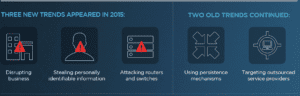
The same FireEye report highlighted new trends for 2019, including hackers causing significant disruptions. They disrupt businesses, steal personally identifiable information, and attack routers and switches. I believe this new trend will continue into the foreseeable future.
Companies Must Start Focusing On Detection:
Far too many people and companies rely on prevention rather than detection. We cannot guarantee that a hacker cannot or will not hack your system. What will happen if they do hack into your design? How will you know they are on your system? This is where Cyber Security Consulting Ops can help your home or business network implement effective detection strategies to identify unwanted visitors on your system. We MUST shift our focus to both prevention and detection. Intrusion Detection can be defined as “…the act of detecting actions that attempt to compromise the confidentiality, integrity, or availability of a resource.” Intrusion detection aims to identify entities attempting to subvert in-place security controls. Assets must be used as bait to entice and track evil entities for early warning.

I must say you have hi quality articles here. Your blog
can go viral. You need initial boost only. How to get it? Search for; Miftolo’s
tools go viral
Thanks